
Your CRM is now your phone.
RedCactus Bubble links the CRM your team already lives in to the phone system they call from — so every call arrives with the customer’s details on screen, and every conversation is logged where the business can see it.
For teams that need CRM integration and solid telephony — not a full contact centre.
For teams who would rather stay in one screen than learn a new system.
Professional services
Client history on screen before the conversation starts.
Finance
Every interaction logged against the customer, automatically.
Legal
Matter context in front of whoever picks up the phone.
Education
Student and parent records surfaced on inbound calls.
Local government
Resident history without hunting through systems.
Real estate
Dial straight from the listing or contact record.
Utilities
Account detail on screen for high-volume enquiry lines.
Managed services
Ticket and client context tied to every call.
Stop searching. Stop copying. Stop writing it up later.
Every conversation starts with the customer’s history on screen and ends logged in the CRM — so the next person picks up exactly where the last one left off. Nothing changes about the CRM or the phone platform.
Book a discovery callSix things your team stops doing by hand.
Click-to-dial
Dial any number from the CRM record — or, on Desktop, from any application on the machine.
Full call control
Answer, hang up, hold and transfer without leaving the screen you are working in.
Contact search
Find the right person across your CRM database in a keystroke, then call them.
Presence
See who is free before you transfer — presence shows inside the CRM interface.
Screen pop
Inbound calls surface the matching customer record before you say hello.
Call history and notes
Activity lands against the customer record. No double entry, no lost context.
The customer’s record, open before you say hello.
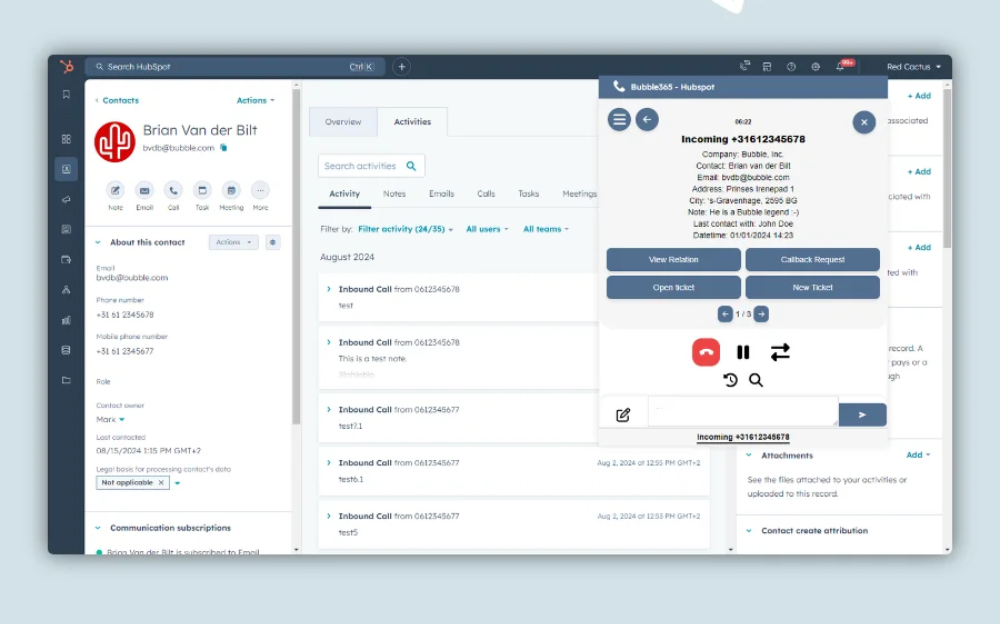
An example of RedCactus embedded in HubSpot
Bubble Desktop or Bubble Embedded — chosen per user.
Staff who work across many applications take Desktop. Staff who live in the CRM all day take Embedded. Both can run side by side in the same business.
Bubble Desktop
A small app in the system tray that works across everything on the machine, on Windows or macOS.
Bubble Embedded
Sits inside the CRM itself with a native look and feel. Nothing to install, no extra window to manage.
200+ CRMs. 85+ phone systems. One bridge between them.
Not on the list? New CRM and phone connectors can be built to order, or your developers can use the third-party API, SQL connector and HTTP requester. We confirm compatibility before any quote is issued.
The questions IT asks first.
Where the data lives, what gets installed, and who keeps it running.
Your data never leaves the CRM
There is no data synchronisation. Bubble reads and writes through the CRM’s own API in real time, so customer data stays where it is, under the controls you already have.
Almost nothing to install
Embedded needs no installation at all. Desktop is a small application per machine that updates itself. Both can be mixed across the same business.
More than one CRM is fine
Several CRMs can be active for the same user at no extra licence cost — useful while a migration is underway or when teams run different systems.
Support where your people work
An in-depth knowledge base is embedded in the app, Eva the built-in chat assistant answers day-to-day questions, and Flexr handles configuration changes, adds and moves.
Name the problem — there’s a product for it.
Bubble puts the customer on screen. These handle the queue, the compliance and the numbers behind it.
Queues, routing and agent reporting
Contact centre teams get queues and omni-channel; everyone else gets Bubble. They coexist happily.
CC4TeamsCompliant recording and quality review
Automated recording, retention and AI analysis across the phone platform.
CallCabinetCall and usage analytics
Real-time and historical reporting on queues, agents and Teams adoption.
Clobba FlexThe calling service underneath it all
Carrier-grade Teams calling on an Australian-owned, geo-redundant network.
Operator ConnectReady to see it on your CRM?
Tell us which CRM and phone platform you run. We’ll confirm compatibility, then walk you through Bubble, licensing and rollout on your own set-up.