
Every conversation. Recorded, compliant, understood.
CallCabinet turns Microsoft Teams into a fully compliant recording and AI-analytics platform — no PBX, no hardware, no complexity. Flexr consults, configures, deploys and supports it end to end.
If it wasn’t captured, it didn’t happen.
Native Teams recording leaves gaps — files scattered across users, retention you can’t police, and no way to prove what was said. CallCabinet records on its own infrastructure, centrally, automatically, and to the standard your regulator expects.
Book a discovery callWhere the obligation is heaviest.
Retention rules, evidence requests and audits differ by sector. We configure recording, storage and redaction to the obligations you actually carry.
Financial services
Dodd-Frank and MiFID II recording, retention and legal hold — with the evidence trail to back it.
Healthcare
Encrypted recording of protected patient data with strict, auditable retention.
Retail
PCI DSS-aligned recording with card-data redaction so payment details never sit in an audio file.
Government
Data sovereignty by design — per-site storage partitions and single-pane oversight.
Manufacturing
Real-time monitoring and granular control across multiple sites and teams.
Contact centres
Automated QA, sentiment and topic analysis on every call, from any platform.
It records. It protects. It understands.
Three jobs, done without anyone remembering to press a button.
It records
A compliance policy captures every in-scope Teams call automatically — nothing for an agent to start or stop, and nothing left to memory.
It protects
Stored centrally with encryption, multi-factor access, configurable retention, legal hold and compliant sharing when evidence is requested.
It understands
AI transcribes, scores and analyses each call — surfacing sentiment, risk and coaching insight without anyone listening back.
The capability set, end to end.
Always-on recording
Automated capture on CallCabinet infrastructure, not Teams native — centrally stored, admin-controlled.
Unlimited cloud storage
No channel limits and no capacity planning. Every user can record at once.
Encryption and MFA
Encrypted at rest and in transit, with multi-factor access control over who can hear what.
Configurable retention
Retention policies per site and per group, matched to the rules your sector carries.
Transcription and summaries
Searchable, multilingual transcripts with AI summarisation — read a call instead of replaying it.
Automated QA scorecards
Score every call against your own criteria, not a hand-picked sample.
Legal hold and sharing
Preserve calls under investigation and share them compliantly with auditors or counsel.
Legacy archive migration
Ingest recordings from your old or proprietary system so history moves with you.
Find any call in seconds. Understand it without listening to it.
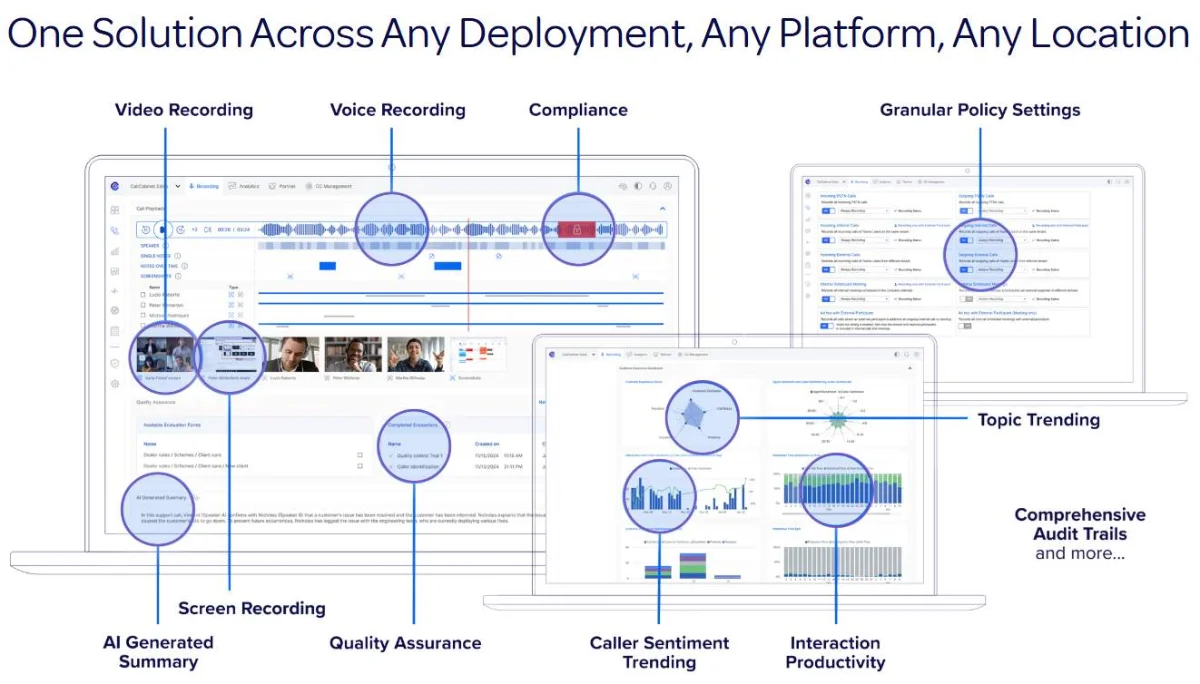
Stop sampling five calls a month.
Manual QA reviews a fraction of your conversations and misses the ones that matter. CallCabinet transcribes, scores and analyses all of them — so coaching, risk and customer sentiment come from the whole picture.
Three levels. Each one builds on the last.
Start at the compliance baseline and step up only where you need desktop capture or full AI analysis. Optional add-ons cover redaction, transcription, video and API access.
Core Recording
Record, store and play back every in-scope conversation, with the controls an auditor asks for.
Advanced Recording
Everything in Core, extended to screen capture and structured quality assurance.
Conversational Analytics
Everything in Advanced, plus the AI Assistant analysing every conversation you have.
Licensed per recorded agent · scoped with you during consultation
The questions asked before every recording project.
Your archive, your licence count, and what happens when volumes move.
You keep your archive
CallCabinet migrates recordings out of legacy or proprietary systems and aggregates old and new in one platform. Retire the old kit without losing history.
Recording is never blocked
Licence counts do not stop capture. If you over-consume, recording continues and the overage is reconciled in arrears — you never lose a call to a licensing edge case.
Born in the cloud, not lifted into it
No containers capping simultaneous channels, no premise hardware to maintain, no annual upgrade project. Scale to seasonal demand without paying for idle capacity.
Only recorded people need licences
Agents are recorded; users log in to review. Managers, QA and compliance staff can use the portal without consuming an agent licence.
Name the problem — there’s a product for it.
CallCabinet records the conversation. These shape the conversations that get recorded.
A full contact centre inside Teams
Omni-channel queues, skills-based routing and supervisor tooling in the app your team already uses.
CC4TeamsThe calling service underneath it all
Carrier-grade Teams calling on an Australian-owned, geo-redundant network.
Operator ConnectAdoption and call-quality visibility
See how Teams is really being used, and where call quality is letting people down.
ClobbaYour CRM on screen when the call connects
Click-to-dial and screen-pop across 200+ business applications.
RedCactusReady to make every conversation count?
Book a discovery call and we’ll walk your obligations, your retention rules and your existing archive — then show you exactly how CallCabinet handles them.